Engula ValueSight
Overview of Engula
Engula is a high-performance caching kernel product, purpose-built for open-source Redis users seeking greater efficiency and lower operational costs. Its primary objective is to reduce hardware expenditure for existing Redis clusters while maintaining maximum compatibility and minimal risk.
Key Strengths
-
Minimal Core Modifications Engula maintains system stability and interoperability through lightweight kernel adjustments. The current release is 100% protocol-compatible with Redis 7.2.4.
-
Substantial Memory Efficiency Significantly reduces metadata overhead via a self-developed Compressed HybridLog Storage Engine, minimizing in-memory data representation.
-
Enhanced Performance Optimizations End-to-end performance improvements through:
- Optimized HashTable structure
- Efficient network thread communication
- Improved CPU prefetch hit rates
- Integration of an asynchronous thread framework
Based on early user adoption tests, Engula demonstrates over 50% average memory savings with a performance cost of less than 10%.
Engula ValueSight Overview
Engula ValueSight is a diagnostic and evaluation tool that enables users to quantitatively assess the benefits of adopting Engula in real-world scenarios. It allows one-click comparison of memory usage between Engula and Redis using actual production data, producing intuitive insight into Engula’s efficiency.
Core Capabilities
- Memory Usage Analysis — Compare Resident Set Size (RSS) memory between Engula and Redis for identical datasets.
- Visual Reporting — Generate detailed visual charts showing comparative memory profiles.
- Comprehensive Summary Output — Produce concise analytical summaries illustrating key optimization insights.
Usage Instructions
Runtime Environment
Engula ValueSight is packaged as a Docker image, compatible with Linux and macOS environments that have Docker installed.
Recommended Environment:
| Component | Requirement |
|---|---|
| CentOS | ≥ 7.9 |
| Ubuntu | ≥ 18.04 |
| Docker | Official version recommended (refer to the Docker Documentation) |
| CPU | ≥ 2 physical cores |
Running the Analysis
-
Prepare an RDB File Generate a Redis
dump.rdbusing theBGSAVEcommand. -
Download the Engula ValueSight Image
-
Create an Output Directory
-
Run the Analysis
Replace
<RDB_FILE_PATH>with the absolute path to yourdump.rdb.
Example Execution
Assuming Docker is installed and your dump.rdb resides in the current directory, execute:
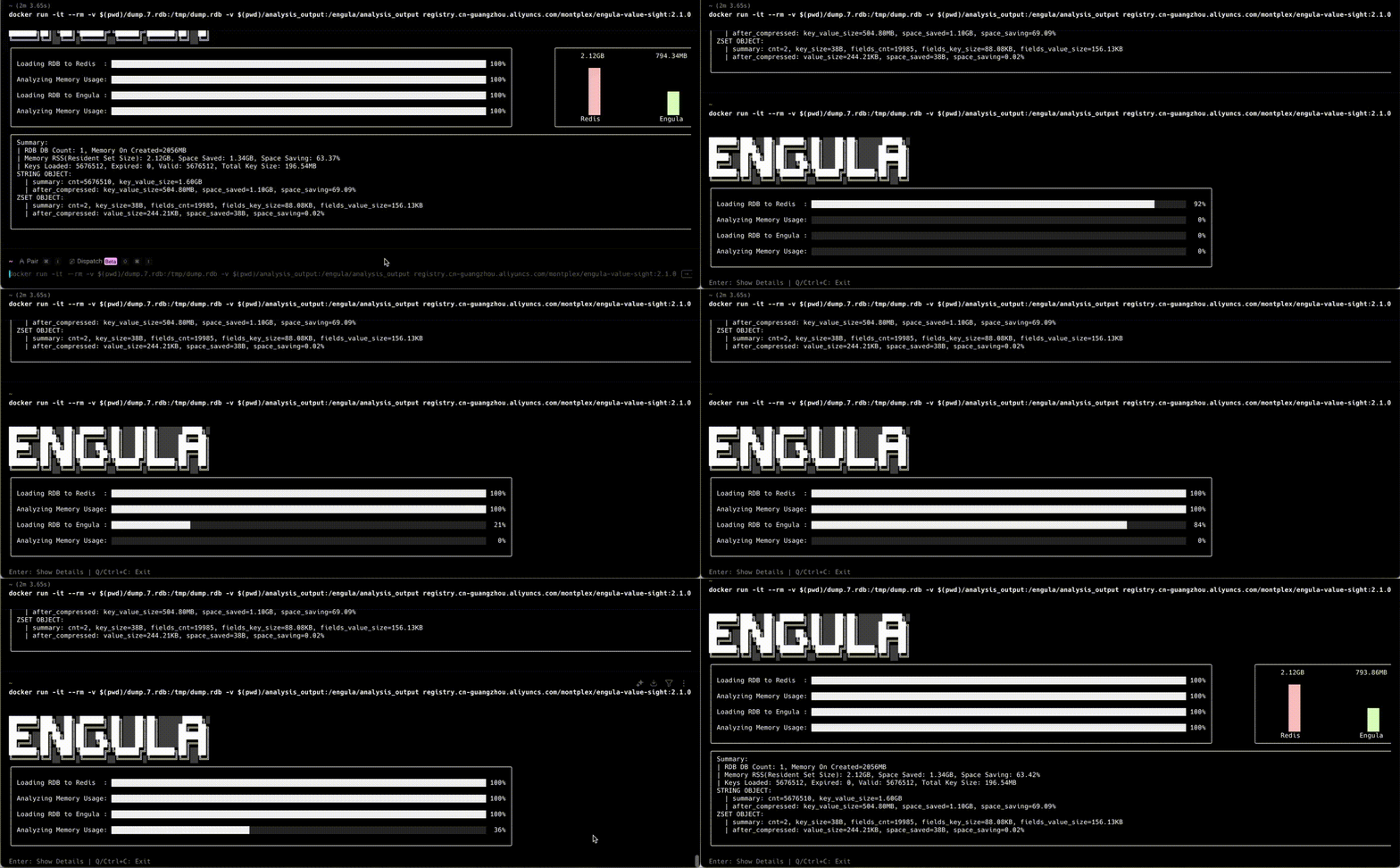
Runtime Example:
Sample Output:
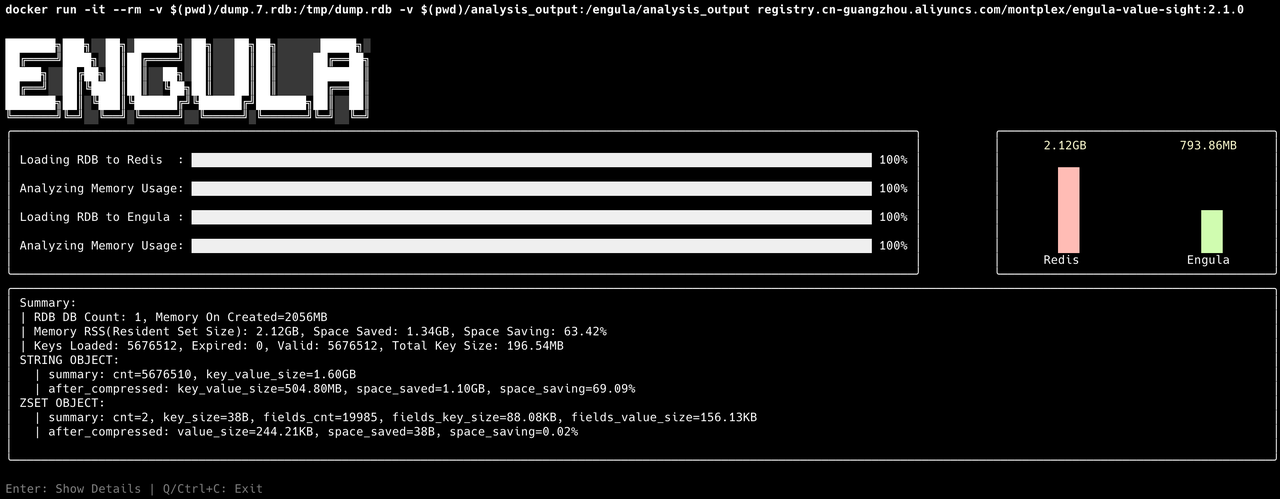
After the analysis completes, press Enter to view the details or Q / Ctrl+C to exit.
Batch Compression Rate Evaluation
Procedure
-
Create Required Directories
-
Organize RDB Files
- Place one or more
.rdbfiles intordb_dir(supports nested directories). - The tool automatically scans and processes all files ending in
.rdb.
- Place one or more
-
Download the Image
-
Run Batch Processing
✅ Ensure the
rdb_dirandanalysis_outputmappings correctly reference existing directories.
Shard Aware Evaluation
If an RDB filename ends with an underscore followed by a number, that number is automatically treated as the shard count in the final summary.
Example:
This filename will be recognized as having 1000 shards, improving the accuracy of memory consolidation statistics.
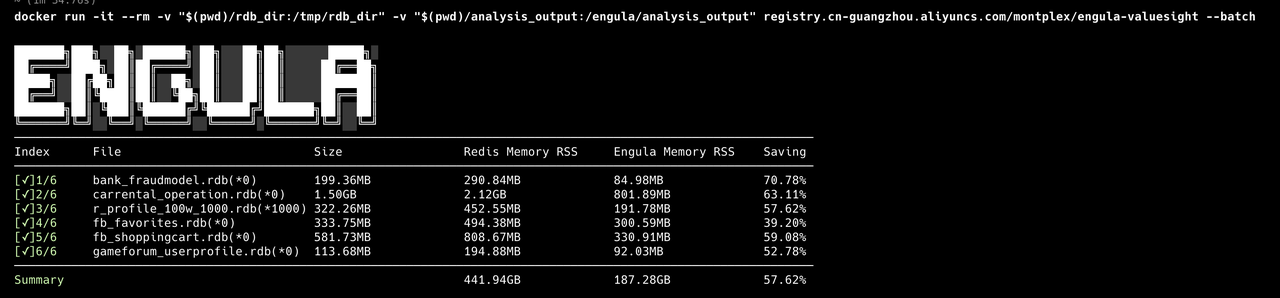
Batch Execution:
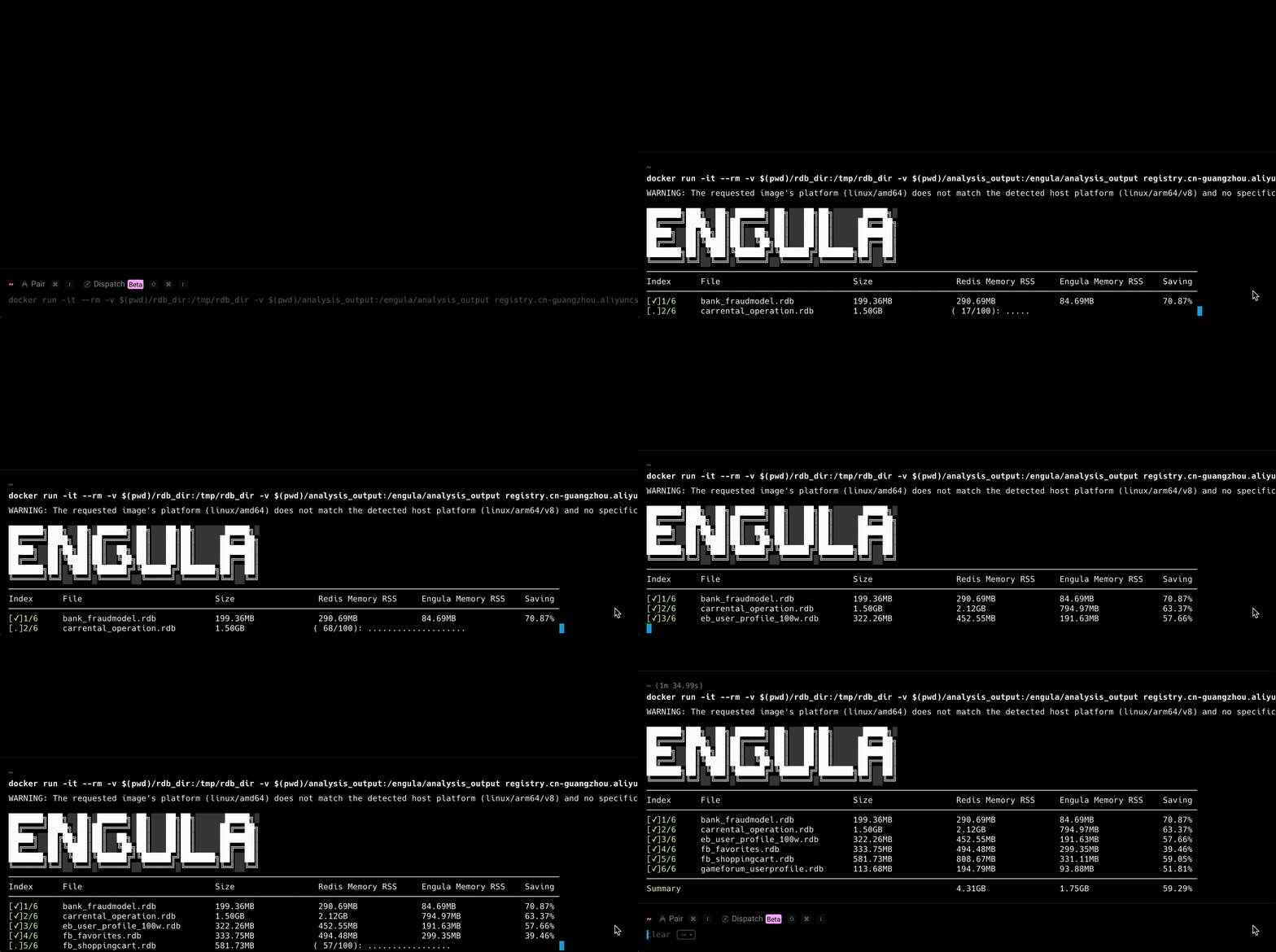
Batch Results:
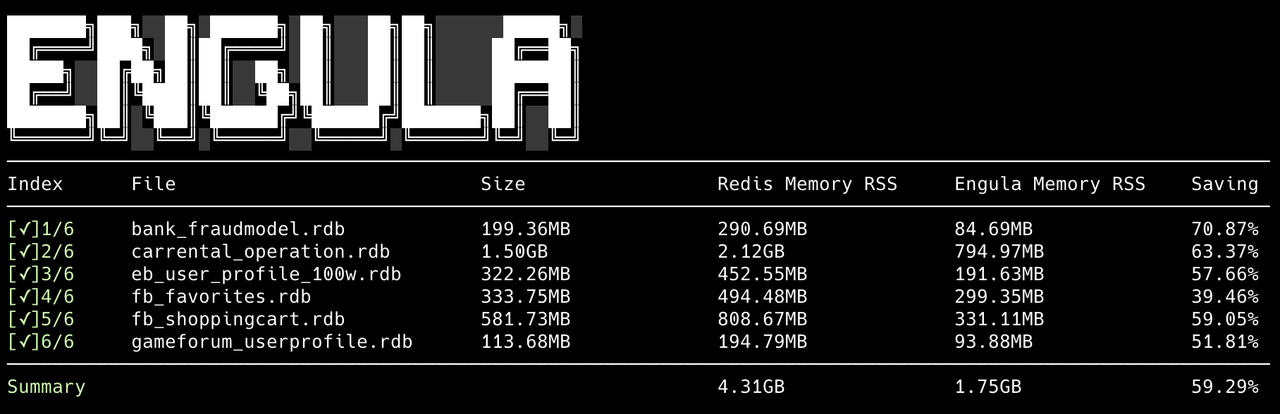
Output Directory Structure
Each .rdb file produces four associated output files:
| File Name | Description |
|---|---|
_dump_1.rdb_cmd_output_for_engula.log |
Execution log for Engula analysis |
_dump_1.rdb_cmd_output_for_redis.log |
Execution log for Redis evaluation |
_dump_1.rdb_engula-stats-rdb.json |
Parsed statistics from Engula evaluation |
_dump_1.rdb_redis-stats-rdb.json |
Parsed statistics from Redis evaluation |
A global
info.logis also generated to record high-level process events.
To troubleshoot or verify specific results, consult the corresponding logs in the analysis_output directory.
Running in the Background
Batch analysis across multiple RDB files can take significant time. For extended tasks, execute Engula ValueSight in the background:
Monitor Progress:
FAQ
Docker Memory Allocation Too Small
Error Message:
Cause: High memory consumption during large RDB analysis exceeding Docker’s allocated memory.
Resolution:
- Increase memory limits in Docker Desktop (recommended ≥ 4 GB).
- Split oversized RDB files and analyze in smaller batches.
Debugging and Logs
After analysis, check diagnostic outputs located in the analysis_output directory.
If you encounter unexpected results, include these logs when contacting the Engula technical team.
Docker Installation on Red Hat Linux
On RHEL 9, running:
may yield:
which is unsupported.
Follow the official Docker installation guide for proper setup:
-
Remove Old Versions
-
Install Dependencies and Add Repository
-
Install the Latest Docker Components
-
Start the Docker Service
Batch Mode: “rdb file not found” Error
This issue occurs when the container isn’t running as root, preventing access to mounted directories.
Fix:
Add the --user root flag:
Contact Us
If you experience issues or want to learn more about Engula or Engula ValueSight, reach out to our support team:
📧 Email: support@engula.io
Support Hours: Monday – Friday, 09:00 – 18:00 UTC+8 We aim to respond promptly to all technical inquiries. Engula Technical Team — Empowering next‑generation caching performance and observability. 🚀